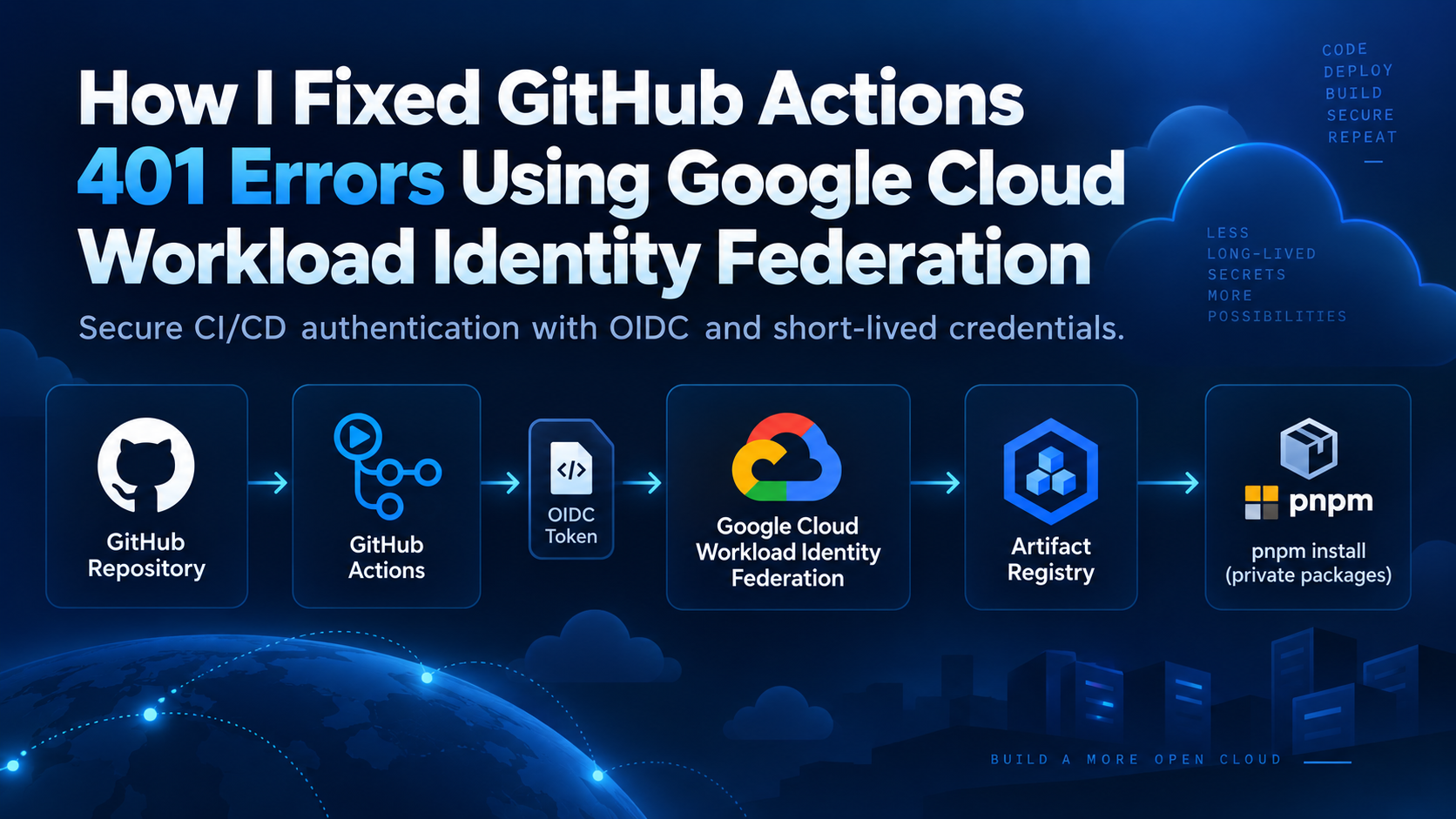
How I Fixed GitHub Actions 401 Errors Using Google Cloud Workload Identity Federation
A practical DevOps walkthrough of securely connecting GitHub Actions to Google Cloud Artifact Registry using OIDC — without storing service account JSON keys.
Introduction
During a recent CI/CD troubleshooting task, I encountered a GitHub Actions workflow that consistently failed while trying to install a private Node.js package hosted in Google Cloud Artifact Registry.
The pipeline was returning:
ERR_PNPM_FETCH_401
401 Unauthorized
At first, this looked like a package-management or registry configuration issue.
But after tracing the complete authentication flow, I found that the package itself was available, the registry configuration was correct, and developers could install the dependency successfully from their authenticated local environments.
The actual issue was elsewhere:
The GitHub Actions runner did not have an identity that Google Cloud trusted.
Rather than fixing the problem by creating a long-lived Google Cloud service account JSON key and storing it inside GitHub Secrets, I implemented Google Cloud Workload Identity Federation with GitHub OIDC.This allowed GitHub Actions to authenticate to Google Cloud using short-lived credentials, while keeping the access restricted to the required repository and following the principle of least privilege.
In this article, I'll walk through the problem, the investigation, the architecture, the implementation, and the key lessons from solving it.
The Problem
The CI pipeline needed to install a private package similar to @my-org/private-package
The project already contained an .npmrc configuration pointing the package scope to Google Artifact Registry:
@my-org:registry=https://REGION-npm.pkg.dev/PROJECT_ID/npm-repository/
//REGION-npm.pkg.dev/PROJECT_ID/npm-repository/:always-auth=true
From an authenticated developer machine, the dependency installation worked successfully:
pnpm install
However, when the same installation ran inside GitHub Actions, the workflow failed with:
ERR_PNPM_FETCH_401

GET https://REGION-npm.pkg.dev/PROJECT_ID/npm-repository/...
401 Unauthorized
This immediately narrowed down the investigation.
The GitHub runner could reach Artifact Registry, so this was not primarily a network connectivity problem.
The package existed.
The registry endpoint was correct.
The missing piece was authentication.
What Was Actually Happening?
On a developer workstation, the authentication path looked roughly like this:
Developer Machine
       |
       | Existing Google Cloud credentials
       v
Google Artifact Registry
       |
       v
Private Package
       |
       v
pnpm install
But the GitHub-hosted runner was different:
GitHub Actions Runner
       |
       | No trusted GCP identity
       |
       X
Google Artifact Registry

401 Unauthorized
GitHub-hosted runners are temporary environments. They do not automatically inherit a developer's Google Cloud credentials or permissions.
That meant I needed to establish a secure identity relationship between:
GitHub Actions → Google Cloud .
Authentication vs Authorization
Before implementing the solution, it was important to separate two concepts that are often mixed together during IAM troubleshooting:
Authentication answers:
Who are you?
Authorization answers:
What are you allowed to do?
In this case, Artifact Registry IAM permissions alone were not enough.
The GitHub Actions runner first needed to establish a trusted identity with Google Cloud. Only after that identity was established could Google Cloud evaluate whether it had permission to read packages from Artifact Registry.
The flow therefore had two separate layers:
GitHub Actions
      |
      | Authentication
      v
Google Cloud Identity
      |
      | Authorization
      v
Artifact Registry
This distinction became important during troubleshooting because simply adding more IAM roles would not solve a missing authentication mechanism.
Why I Didn't Use a Service Account JSON Key
The quickest solution would have been to create a service account key, store the JSON file as a GitHub Secret, and authenticate the workflow using that credential.
The architecture would look roughly like this:
GitHub Actions
      |
      | Stored JSON Key
      v
Service Account
      |
      v
Google Cloud
      |
      v
Artifact Registry
This approach can work, but it introduces a long-lived credential that has to be securely managed throughout its lifecycle.
That means additional responsibility around:
Key storage
Key rotation
Secret management
Accidental exposure
Revocation
Auditing
For a CI/CD workload, I wanted to avoid introducing a permanent Google Cloud private key if a federated authentication mechanism was available.
The better approach was:
Allow GitHub to prove its identity to Google Cloud using OIDC and issue short-lived credentials only when the workflow runs.
The Solution: Workload Identity Federation
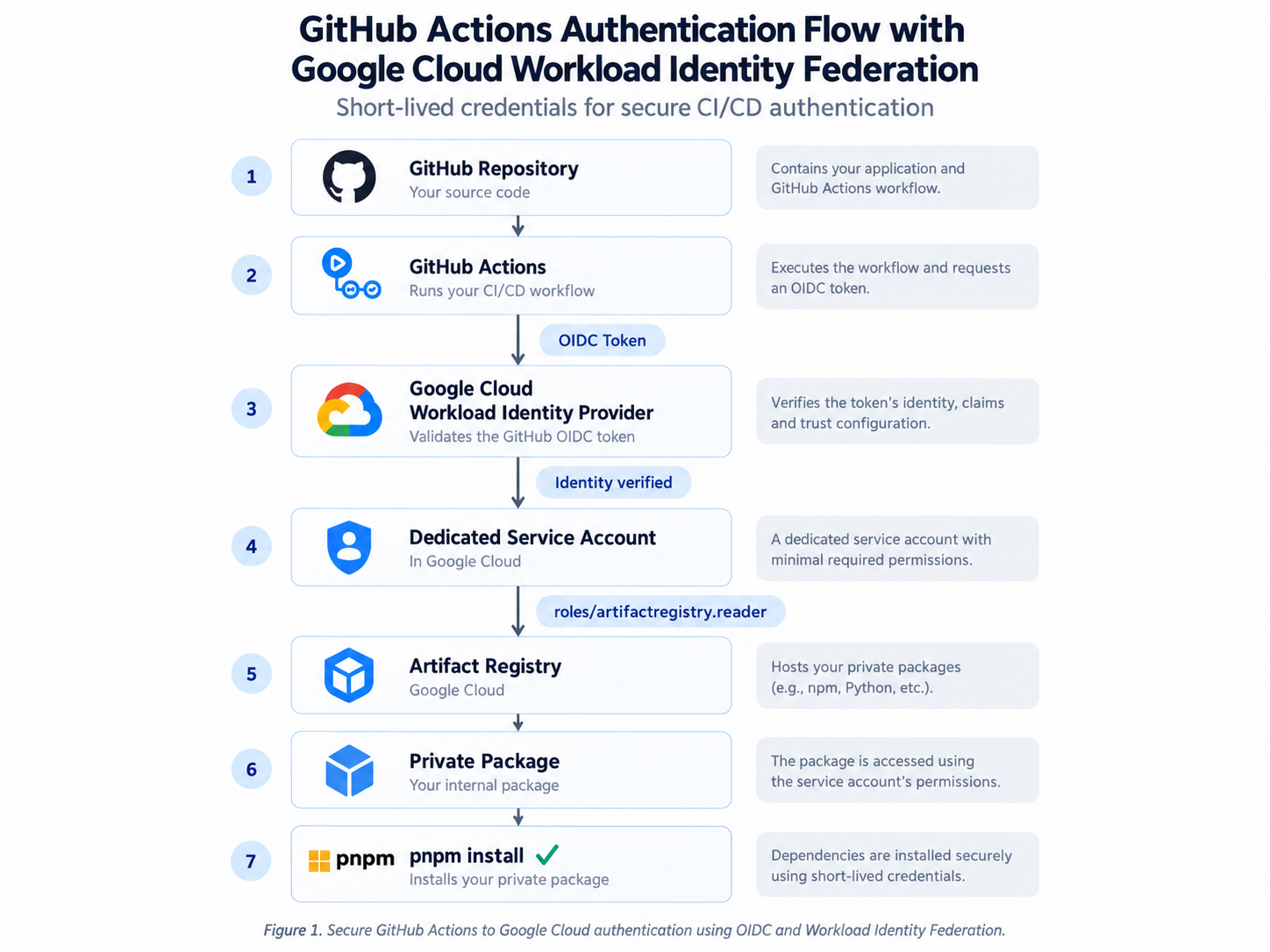
Figure 1: GitHub Actions authentication flow using OIDC and Google Cloud Workload Identity Federation.
This architecture removed the need for a long-lived Google Cloud key in GitHub, restricted trust to the intended repository, and allowed the pipeline to use short-lived credentials with least-privilege access.
With Workload Identity Federation, GitHub Actions does not need to store a Google Cloud service account private key.
Instead, GitHub issues an OpenID Connect (OIDC) token representing the workflow that is currently running.
Google Cloud evaluates that token through a configured Workload Identity Provider.
If the claims in the token match the trust rules that have been configured, the workload can obtain temporary Google Cloud credentials.
Conceptually, the authentication flow becomes:
GitHub Repository
       |
       v
GitHub Actions
       |
       | OIDC Token
       v
Google Cloud
Workload Identity Provider
       |
       | Validate identity
       v
Dedicated Service Account
       |
       | Least-privilege IAM
       v
Artifact Registry
       |
       v
Private Package
       |
       v
pnpm install
This architecture gave me three important improvements:
No long-lived Google Cloud key stored in GitHub
Repository-specific trust
Least-privilege access to Artifact Registry
The objective was no longer simply to make the pipeline succeed.
The objective was to make it succeed securely.
Implementation
With the authentication architecture understood, I moved on to implementing the trust relationship between GitHub Actions and Google Cloud.
The configuration involved four security boundaries:
GitHub Repository
        ↓
Workload Identity Provider
        ↓
Service Account
        ↓
Artifact Registry IAM
Each layer has a different responsibility, so I configured and validated them independently rather than treating Workload Identity Federation as a single IAM setting.
Prerequisites
Before implementing the solution, make sure you have:
A Google Cloud project with an Artifact Registry repository
A GitHub repository with a GitHub Actions workflow
The Google Cloud CLI (
gcloud)Permissions to create service accounts and configure IAM/WIF
The required Google Cloud APIs enabled
Then use this Shell/Bash block:
gcloud services enable \
  iam.googleapis.com \
  cloudresourcemanager.googleapis.com \
  iamcredentials.googleapis.com \
  sts.googleapis.com \
  artifactregistry.googleapis.com \
  --project="${PROJECT_ID}"
Google's current deployment-pipeline documentation explicitly calls out enabling IAM, Resource Manager, Service Account Credentials, and Security Token Service APIs for WIF configuration.
Step 1 — Define the Required Values
Before creating resources, I defined the values that would be reused throughout the configuration:
PROJECT_ID="my-gcp-project"
POOL_ID="github-actions"
PROVIDER_ID="github-provider"

GITHUB_ORG="my-organization"
GITHUB_REPO="my-application"

SERVICE_ACCOUNT_NAME="github-artifact-reader"

REGION="us-central1"
ARTIFACT_REPOSITORY="npm-repository"
All values in this article are intentionally generic.
In a real environment, these should be replaced with the appropriate Google Cloud project, GitHub organization, repository, region, and Artifact Registry repository.
Step 2 — Create a Dedicated Service Account
Instead of reusing an existing application or default service account, I created a dedicated identity for this CI workload:
gcloud iam service-accounts create "${SERVICE_ACCOUNT_NAME}" \
  --project="${PROJECT_ID}" \
  --display-name="GitHub Artifact Registry Reader"
The resulting service account follows this format:
github-artifact-reader@my-gcp-project.iam.gserviceaccount.com
I then stored the service account email for use in the remaining commands:
SERVICE_ACCOUNT_EMAIL="${SERVICE_ACCOUNT_NAME}@${PROJECT_ID}.iam.gserviceaccount.com"
Using a dedicated service account makes the access path easier to audit.
Instead of asking why a generic service account has Artifact Registry permissions, its purpose is immediately visible from the identity itself.
Step 3 — Grant Only Artifact Registry Read Access
The CI pipeline only needed to download a private package.
It did not need permission to:
publish packages
delete package versions
create repositories
administer Artifact Registry
Therefore, I granted the service account:
roles/artifactregistry.reader
at the repository level:
gcloud artifacts repositories add-iam-policy-binding \
  "${ARTIFACT_REPOSITORY}" \
  --project="${PROJECT_ID}" \
  --location="${REGION}" \
  --member="serviceAccount:${SERVICE_ACCOUNT_EMAIL}" \
  --role="roles/artifactregistry.reader"
This keeps the permission scoped to the repository that the CI workflow actually needs.
Least privilege is not just about choosing the correct role. Scope matters too.
Giving Artifact Registry Reader on a single repository is more restrictive than granting unnecessary project-wide access.
Step 4 — Get the Google Cloud Project Number
Workload Identity Federation principal identifiers use the project number, not the normal project ID.
I retrieved it with:
PROJECT_NUMBER=$(gcloud projects describe "${PROJECT_ID}" \
  --format="value(projectNumber)")
You can verify it with:
echo "${PROJECT_NUMBER}"
Later IAM principal strings require the project number, not the project ID.
Step 5 — Create the Workload Identity Pool
The next step was to create a Workload Identity Pool that would represent external workloads allowed to authenticate to Google Cloud.
In this case, the external workload is GitHub Actions.
I created the pool with:
gcloud iam workload-identity-pools create "${POOL_ID}" \
  --project="${PROJECT_ID}" \
  --location="global" \
  --display-name="GitHub Actions Pool"
I then retrieved the full resource name of the pool:
WORKLOAD_IDENTITY_POOL_ID=$( \
  gcloud iam workload-identity-pools describe "${POOL_ID}" \
    --project="${PROJECT_ID}" \
    --location="global" \
    --format="value(name)" \
)
To verify it:
echo "${WORKLOAD_IDENTITY_POOL_ID}"
The output follows this format:
projects/123456789012/locations/global/workloadIdentityPools/github-actions
This full identifier becomes important later when creating the IAM trust relationship between GitHub and the service account.
The Workload Identity Pool does not itself give GitHub access to Google Cloud resources. It creates the trust boundary where external identities can be evaluated.
Step 6 — Configure GitHub as the OIDC Provider
Next, I configured GitHub Actions as an OIDC identity provider inside the Workload Identity Pool.
GitHub's Actions OIDC issuer is:
https://token.actions.githubusercontent.com
I created the provider using:
gcloud iam workload-identity-pools providers create-oidc "${PROVIDER_ID}" --project="${PROJECT_ID}" --location="global" --workload-identity-pool="${POOL_ID}" --display-name="GitHub OIDC Provider" --issuer-uri="https://token.actions.githubusercontent.com" --attribute-mapping="google.subject=assertion.sub,attribute.actor=assertion.actor,attribute.repository=assertion.repository,attribute.repository_owner=assertion.repository_owner" --attribute-condition="assertion.repository_owner == '${GITHUB_ORG}'"
The attribute mapping allows Google Cloud to extract useful information from the GitHub OIDC token, including:
GitHub actor
Repository
Repository owner
OIDC subject
The important security control here is:
assertion.repository_owner == '${GITHUB_ORG}'
This prevents repositories outside the intended GitHub organization from being admitted through this provider.
Google's current guidance specifically recommends applying an attribute condition for multi-tenant identity providers such as GitHub rather than trusting the issuer alone
Next, I retrieved the provider's complete resource name:
WORKLOAD_IDENTITY_PROVIDER=$( \
  gcloud iam workload-identity-pools providers describe \
    "${PROVIDER_ID}" \
    --project="${PROJECT_ID}" \
    --location="global" \
    --workload-identity-pool="${POOL_ID}" \
    --format="value(name)" \
)
Verify it with:
echo "${WORKLOAD_IDENTITY_PROVIDER}"
The result should look similar to:
projects/123456789012/locations/global/workloadIdentityPools/github-actions/providers/github-provider
This is the value that will later be passed to the GitHub Actions authentication step.
Production hardening: For higher-assurance environments, consider using GitHub's immutable repository_owner_id and repository_id claims instead of relying only on organization and repository names. Google recommends numeric ID claims because names can potentially be reused after deletion or ownership changes.
Step 7 — Restrict Service Account Impersonation to the Required Repository
Creating the Workload Identity Provider establishes trust with GitHub, but I still needed to control which repository could use the service account.
First, I built the complete repository name:
REPO="${GITHUB_ORG}/${GITHUB_REPO}"
For example:
my-organization/my-application
I then granted the GitHub repository the:
roles/iam.workloadIdentityUser
role on the dedicated service account:
gcloud iam service-accounts add-iam-policy-binding "${SERVICE_ACCOUNT_EMAIL}" --project="${PROJECT_ID}" --role="roles/iam.workloadIdentityUser" --member="principalSet://iam.googleapis.com/${WORKLOAD_IDENTITY_POOL_ID}/attribute.repository/${REPO}"
This is an important part of the security model.
The provider accepts workloads from the trusted GitHub organization, while the service account IAM binding narrows actual impersonation down to:
my-organization/my-application
Conceptually:
GitHub
   |
   +-- my-organization/repository-a     ❌
   |
   +-- my-organization/repository-b     ❌
   |
   +-- my-organization/my-application   ✅
                     |
                     v
          Dedicated Service Account
This provides two levels of restriction:
Provider level
    ↓
Trusted GitHub organization

IAM level
    ↓
Specific GitHub repository
The current Google authentication action documents this same principalSet repository-binding pattern when using Workload Identity Federation through a service account.
Trust the organization at the identity-provider layer, then restrict actual service-account usage to the repository that needs it.
Note: Google Cloud also supports direct Workload Identity Federation for services that accept federated principals directly. The current Google GitHub authentication action describes direct WIF as the preferred model where supported. This implementation intentionally uses Workload Identity Federation through a dedicated service account because it provides a clear service-account identity for the CI workload and matches the IAM model used in this scenario.
Step 8 — Configure the GitHub Actions Workflow
With the Google Cloud side configured, I moved to the GitHub Actions workflow.
The workflow first needs permission to request an OIDC token.
At the job or workflow level, I added:
permissions:
  contents: read
  id-token: write
The key permission is:
id-token: write
This does not give the workflow write access to Google Cloud.
It only allows GitHub Actions to request an OIDC token. Google Cloud IAM still determines what that identity is authorized to access.
The authentication portion of the workflow then looks like this:
name: CI
on: pull_request: push: branches: - main
permissions: contents: read id-token: write
jobs: build: runs-on: ubuntu-latest
steps:
  - name: Checkout repository
    uses: actions/checkout@v7

  - name: Authenticate to Google Cloud
    uses: google-github-actions/auth@v3
    with:
      project_id: my-gcp-project
      workload_identity_provider: projects/123456789012/locations/global/workloadIdentityPools/github-actions/providers/github-provider
      service_account: github-artifact-reader@my-gcp-project.iam.gserviceaccount.com

  - name: Set up Google Cloud SDK
    uses: google-github-actions/setup-gcloud@v3
An important detail is the order of operations:
Checkout repository
↓
Authenticate to Google Cloud
↓
Set up gcloud
↓
Access Google Cloud resources
The current google-github-actions/auth documentation specifically requires the repository checkout step to run before the authentication action when credentials files are being generated for later steps.
Why id-token: write matters
Without:
id-token: write
GitHub cannot obtain the OIDC token required for federation.
So even if every Google Cloud IAM configuration is correct, the authentication chain will still fail.
Step 9 — Authenticate npm/pnpm to Artifact Registry
At this point GitHub Actions had a valid Google Cloud identity.
However, pnpm still needed credentials for the private Artifact Registry npm endpoint.
The project .npmrc contained only the repository configuration:
@my-org:registry=https://REGION-npm.pkg.dev/PROJECT_ID/npm-repository/
//REGION-npm.pkg.dev/PROJECT_ID/npm-repository/:always-auth=true
I intentionally did not store an authentication token in the repository.
Instead, after Google Cloud authentication completed, I used Google's Artifact Registry credential helper:
npm_config_registry=https://registry.npmjs.org \
  npx google-artifactregistry-auth
Then the package installation could run normally:
pnpm install --frozen-lockfile
The corresponding GitHub Actions steps become:
  - name: Authenticate npm to Artifact Registry
    run: |
      npm_config_registry=https://registry.npmjs.org \
        npx google-artifactregistry-auth

  - name: Install dependencies
    run: |
      pnpm install --frozen-lockfile
The credential helper reads the Artifact Registry repository configuration from the project's .npmrc and obtains credentials using the Google Cloud identity available in the environment.
Google's current Artifact Registry documentation recommends keeping repository settings in the project .npmrc while storing authentication credentials separately, and documents google-artifactregistry-auth for obtaining the access token.
This means the source repository contains:
Repository location ✅
Package scope ✅
Registry configuration ✅
but does not contain:
Access token ❌
Service account JSON key ❌
Long-lived Google credential ❌
Step 10 — Validate the Complete Authentication Chain
After configuring the workflow, I validated each layer rather than treating a successful build as the only test.
Validate the Workload Identity Pool
gcloud iam workload-identity-pools describe \
  "${POOL_ID}" \
  --project="${PROJECT_ID}" \
  --location="global"
Validate the OIDC Provider
gcloud iam workload-identity-pools providers describe \
  "${PROVIDER_ID}" \
  --project="${PROJECT_ID}" \
  --location="global" \
  --workload-identity-pool="${POOL_ID}"
I verified:
Issuer URI
Attribute mappings
Attribute condition
Provider state
Validate the Service Account Trust Binding
gcloud iam service-accounts get-iam-policy \
  "${SERVICE_ACCOUNT_EMAIL}" \
  --project="${PROJECT_ID}"
I expected to see:
roles/iam.workloadIdentityUser
associated with the required GitHub repository principal.
Validate Artifact Registry Permissions
I also checked the repository IAM policy:
gcloud artifacts repositories get-iam-policy \
  "${ARTIFACT_REPOSITORY}" \
  --project="${PROJECT_ID}" \
  --location="${REGION}"
The dedicated service account should have:
roles/artifactregistry.reader
Validate from GitHub Actions
Inside the workflow, a useful non-secret validation step is:
      - name: Verify Google Cloud authentication
        run: |
          gcloud auth list
          gcloud config get-value project
Avoid printing:
Access tokens
OIDC tokens
Credential files
Service account keys
Secrets
into CI logs.
Finally, I tested the operation that had originally failed:
pnpm install --frozen-lockfile
The workflow could now successfully download the private package from Artifact Registry.
The Result
Before the change, the authentication flow effectively looked like this:
GitHub Actions
      |
      | No trusted Google Cloud identity
      |
      X
Artifact Registry
      |
      v
401 Unauthorized
After implementing Workload Identity Federation:
GitHub Actions
      |
      | OIDC
      v
Workload Identity Provider
      |
      | Repository identity validated
      v
Dedicated Service Account
      |
      | roles/artifactregistry.reader
      v
Artifact Registry
      |
      v
Private Package
      |
      v
pnpm install ✅
The CI pipeline could now access the required private package without storing a long-lived Google Cloud service account key in GitHub.


