Cloud Run vs Compute Engine in GCP
Understand the difference between Cloud Run and Compute Engine, how each service runs applications, and when to choose one over the other.
Introduction
Google Cloud provides several ways to run applications.
Two commonly used options are:
Cloud Run
and
Compute Engine
Both can run applications, but they give you very different levels of control and management responsibility.
The simplest way to remember the difference is:
Cloud Run runs your container while Google manages the infrastructure.
Compute Engine gives you a virtual machine that you manage.
The choice mainly depends on how much infrastructure control your application actually needs.
What Is Cloud Run?
Cloud Run is a fully managed Google Cloud service for running containerized applications.
You package your application into a container and deploy it to Cloud Run.
The basic flow looks like:
Application
     ↓
Container Image
     ↓
Cloud Run
Google Cloud manages much of the underlying infrastructure for you.
You normally do not need to manage:
Virtual Machines
Operating System
Server provisioning
Manual instance creation
Cloud Run can automatically create additional instances when traffic increases and reduce the number of instances when traffic decreases.
For many web applications, APIs, and microservices, this removes a large amount of infrastructure management.
What Is Compute Engine?
Compute Engine provides virtual machines in Google Cloud.
When you create a Compute Engine VM, you select things such as:
Machine type
CPU
Memory
Operating system
Disk
Network configuration
Your application then runs inside that virtual machine.
The architecture looks more like:
Application
     ↓
Operating System
     ↓
Compute Engine VM
     ↓
Google Cloud Infrastructure
Google manages the physical infrastructure, but you have much more responsibility for the virtual machine itself.
For example, depending on your setup, you may need to manage:
Operating system updates
Installed packages
Application dependencies
Security patches
VM configuration
Scaling configuration
This gives you more control, but it also increases your operational responsibility.
Cloud Run vs Compute Engine — Architecture
The main architectural difference is how much infrastructure you need to manage.
With Cloud Run, your application is packaged inside a container and deployed to a fully managed platform.
Application
     ↓
Container
     ↓
Cloud Run
With Compute Engine, your application runs inside a virtual machine where you also manage the operating system and software environment.
Application
     ↓
Operating System
     ↓
Compute Engine VM
This gives us the simplest comparison:
Cloud Run focuses on running your application.
Compute Engine gives you control over the machine running the application.
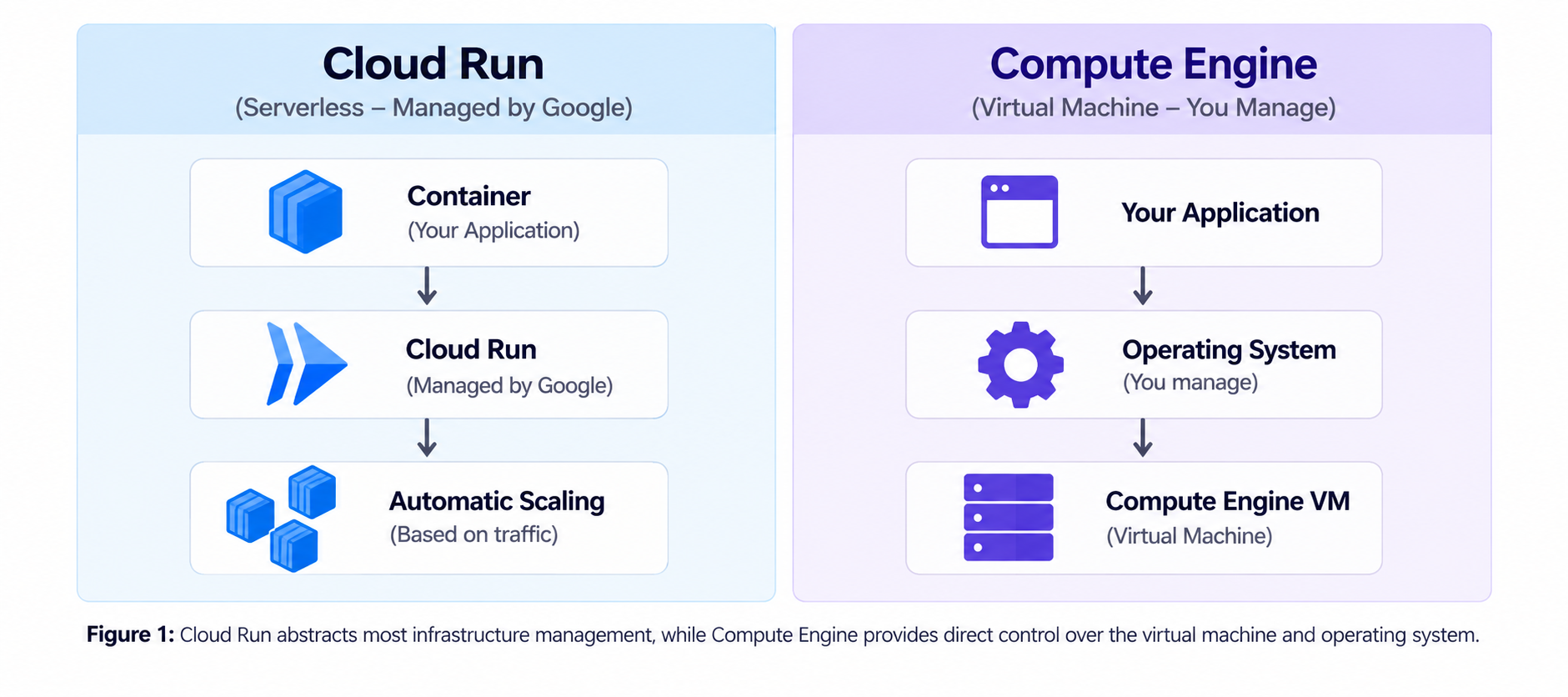
Figure 1: Cloud Run abstracts most infrastructure management, while Compute Engine provides direct control over the virtual machine and operating system.
Management Responsibility
With Cloud Run, Google manages most of the underlying infrastructure.
You mainly focus on:
Application
Container
Configuration
Google Cloud handles the servers and much of the scaling infrastructure behind the service.
With Compute Engine, you have more responsibility.
You typically manage:
Application
Operating System
Installed software
Security updates
VM configuration
This extra responsibility is useful when your application needs a highly customized environment.
Scaling
Cloud Run is designed to scale automatically based on incoming requests.
For example:
Low Traffic
    ↓
Few Instances

High Traffic
    ↓
More Instances
Depending on the configuration, Cloud Run can also reduce the number of running instances when demand decreases.
With Compute Engine, scaling is something you configure yourself.
You can run a single VM or use services such as Managed Instance Groups and autoscaling when multiple VM instances are required.
So the main difference is:
Cloud Run provides built-in autoscaling by default.
Compute Engine gives you more control over how VM scaling is configured.
When Should You Use Cloud Run?
Cloud Run is useful when your application is containerized and you do not want to manage servers.
It works well for applications such as:
Web applications
REST APIs
Microservices
Backend services
Webhook services
For example:
User
 ↓
Cloud Run
 ↓
Containerized Application
Cloud Run is especially useful when traffic changes throughout the day because the platform can automatically adjust the number of running instances.
When Should You Use Compute Engine?
Compute Engine is useful when your workload requires more control over the underlying operating system or virtual machine.
Examples include applications that require:
Full operating system access
Custom system packages
Specific machine configurations
GPU workloads
Legacy applications
Long-running server processes
For example:
User
 ↓
Compute Engine VM
 ↓
Operating System
 ↓
Application
Because you control the VM, you can customize the operating system, networking, software packages, disks, and machine configuration.
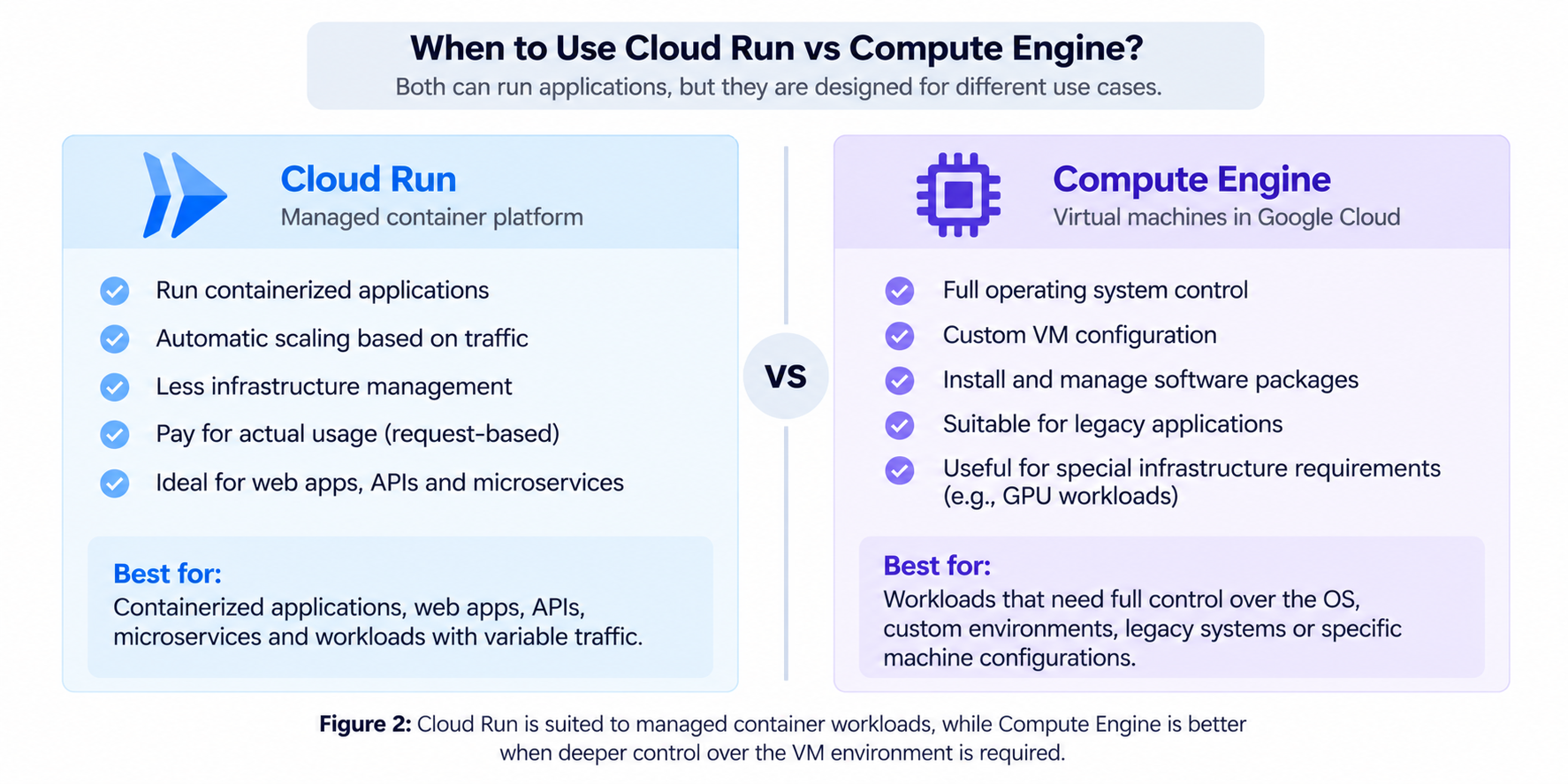
Figure 2: Cloud Run is suited to managed container workloads, while Compute Engine is better when deeper control over the VM environment is required.
Simple Cost Perspective
Cloud Run and Compute Engine also use different billing models.
With Cloud Run, billing depends on the resources used and the billing configuration. Cloud Run supports request-based and instance-based billing.
This can be useful for applications with variable traffic.
With Compute Engine, you generally pay for the VM resources while the virtual machine is running.
This can be suitable for workloads that need continuously running infrastructure or specific machine configurations.
Actual cost depends on factors such as:
CPU
Memory
Region
Traffic
Runtime
VM configuration
So neither service is automatically cheaper for every workload.
Quick Summary
The easiest way to remember the difference is:
Cloud Run = deploy your container and let Google manage most of the infrastructure.
Compute Engine = create a virtual machine and manage the operating system and environment yourself.
Cloud Run gives you simplicity and automatic scaling.
Compute Engine gives you more infrastructure control and flexibility.
Conclusion
Cloud Run and Compute Engine can both run applications in Google Cloud, but they are designed for different requirements.
Use Cloud Run when you have a containerized application and want less infrastructure management.
Use Compute Engine when your application needs full control over the operating system, software environment, machine type, or other VM-level settings.
The main question to ask is:
Do I mainly need to run my application, or do I also need control over the server running it?
If you mainly need to run the application, Cloud Run can provide a simpler approach.
If you need deeper control over the server environment, Compute Engine provides that flexibility.